
To access name cutting, your app must be version 3.0.03 or above. Check the installed version in “About This Device.” If it is earlier than version 3.0.03, update the app through “My” and then “App Upgrade.” Once the required version is installed, open any back film template and locate the Word Cutting feature in its upper-left corner.
Version requirement
Word Cutting is available only in app version 3.0.03 and above. Before looking for the feature in a template, confirm which app version is currently installed by opening “About This Device.”
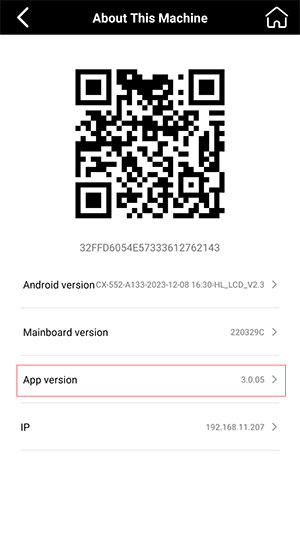
If the displayed version is already 3.0.03 or higher, an app upgrade is not required for this feature. You can proceed to a back film template and look for Word Cutting.
Steps to access Word Cutting
- Check the installed app version. Go to “About This Device” and identify the current version.
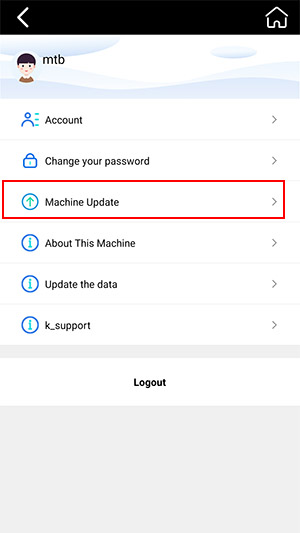
- Upgrade an earlier version. If the version is lower than 3.0.03, go to “My” and select “App Upgrade” to update the app to the latest version.
- Open a back film template. After version 3.0.03 or above is installed, open any back film template.
- Find Word Cutting. The Word Cutting feature is located in the upper-left corner of the back film template.
Supported scope and completion check
The procedure is complete when Word Cutting appears in the upper-left corner of an open back film template. Its location within back film templates is important because the machine is designed specifically for screen protectors and decorative back films.
Standalone sticker-shape cutting is not supported, and sticker cutting is not within the product’s intended application scope. This means the documented option for working with a name or lettering is the Word Cutting feature available inside a back film template, rather than a separate workflow for cutting standalone sticker shapes.
Common Questions
Why can’t I find Word Cutting?
The documented availability requirement is app version 3.0.03 or above. Check “About This Device,” and if the installed version is lower, use “My” and “App Upgrade” before opening a back film template again.
Can the machine cut a standalone sticker shape or letter?
No. The machine does not support cutting standalone sticker shapes. Its documented scope covers screen protectors and decorative back films, with Word Cutting located inside back film templates.
Was this article helpful?
Your feedback helps us improve future articles.